If you’ve ever stepped into a coffee shop with two locations, a boutique that ships orders from a main store and a popup, or even a grocery chain with three neighborhood outlets, you’ve probably noticed how every register rings up sales seamlessly—no crossed tabs, no duplicate inventory counts, no confused staff wondering which location’s account a customer should be charged to. As a Windows POS system supplier, I get asked this question all the time: how does a Windows POS handle sales across different locations? It’s not just about scanning a barcode; it’s a carefully built system that keeps data consistent, compliant, and easy for busy store owners to manage, without the headache of juggling multiple separate tools. Windows POS System
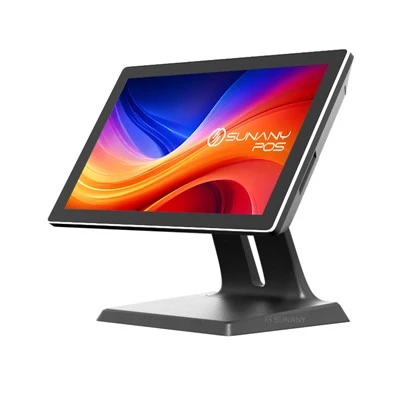
Let me walk you through how this works, from the moment a customer pays to the end-of-day report a manager pulls for the regional team. First, I should start with something that sets our Windows POS apart from older, single-location systems: it uses a cloud-based, centralized backend that all locations connect to, even if one shop is a block away and another is 200 miles away. A lot of small business owners think “centralized” means clunky, but we designed it to run smoothly on Windows 10 or 11 devices—no extra hardware required, just an internet connection. When a store associate at Location A rings up a $15 bulk pack of dog treats, that sale doesn’t just save to that specific register. It sends a real-time update to the main database where Location B, the warehouse, and the regional office all have access.
Wait, let’s break down that first sale step by step. When you log into any Windows POS register at a different location, it doesn’t just pull up that store’s menu—because that would mean updating every single register every time you add a new item. Instead, the item catalog lives in the cloud, linked to your product IDs. If you add a new summer lemonade at your main location, you don’t have to touch the popup shop’s register; the catalog updates automatically within seconds. That same associate at Location A, when they scan the treat’s barcode, pulls up the product that’s listed in the central catalog, so they never accidentally ring up the wrong price or out-of-stock item. That’s how sales stay accurate, no matter where they happen.
Next, what about payment processing? Every location has its own merchant account, right? Customers might pay with a debit card, Apple Pay, or a gift card, and the POS has to route that correctly. A Windows POS system handles this by assigning location-specific settings at checkout—when Location B processes a payment, it uses its own bank credentials, so deposits go to the right account, not the main business’s. We also have a built-in split payment tool that works across locations: if a customer picks up a gift from Location B’s online shop and has it shipped to Location A, they can split their payment between a gift card from Location A and a credit card for the rest, and the POS will send the $5 from the gift card to Location A’s revenue and the $10 to Location B’s, no manual transfers needed. That’s a huge time-saver for managers who used to spend hours at the end of the week reconciling cross-location payments.
Inventory management is another big part of handling multi-location sales. Let’s say Location A sells out of the dog treats, but Location B has 12 in stock. When the associate at Location A tries to ring up another order for that treat, the POS will automatically show them the low stock alert, and even offer the option to transfer inventory from Location B—they just have to approve it, and the system updates both locations’ counts right away. We also let owners set par levels per location: if Location A needs 20 treats on hand at all times, the POS will send a restock alert to the warehouse when it hits 12, while Location B’s par is set to 10, so it alerts the warehouse at 5. No more overstocking one location while another runs out, which cuts down on lost sales for multi-site businesses.
Now, what if your internet cuts out? That’s a fear a lot of business owners have, especially if one location is in a rural area with spotty service. A Windows POS system is designed for offline operation—when the internet goes down, the register stores all sales locally, and syncs them automatically as soon as the connection comes back. I’ve heard horror stories from restaurant owners who lost 300 dollars in sales because their POS shut down when the wifi cut out, but with our system, even if you’re offline for a whole shift, every sale, every refund, every discount is logged, and when you’re back online, it matches up with the central database without any errors. That’s something we worked hard on early on, because we knew consistency even when technology fails is key for multi-location businesses.
For managers and owners, the reporting side is where multi-location sales really come together. Instead of having to log into 5 different accounts to check each store’s sales, you can pull a single report from the Windows POS dashboard that shows total revenue across all locations, top-selling items per location, tax collected per site, and even labor costs tied to each store. Last month, one of our clients with 4 boutique locations used that report to notice that Location C sells twice as many handmade scarves on weekends as Location D, so they shifted their inventory from D to C to avoid wasting space on items that don’t sell. They also used the tax breakdown to make sure each location was charging the right local sales tax, which saved them from a 1,200 dollar fine last quarter. That’s the kind of practical value that a multi-location Windows POS delivers, not just tech jargon.
Discounts and promotions are another piece that’s easy to mess up across locations. If you run a “10% off all shoes” sale online, you don’t want that to apply only to your main shop, or accidentally override a Location-specific “buy one get one free” deal for socks. Our system lets you set promotions with location-specific rules: run a discount at your three city locations only, or make a popup shop’s holiday deal exclusive to that location. When an associate applies a promotion, the POS checks the location’s rules to make sure it’s valid, so you don’t have to worry about staff accidentally applying a nationwide discount to a location that isn’t supposed to have it. We also track who approved a discount, so if a manager wants to review why a 20% discount was applied at a specific location, they can pull that log in 2 clicks.
Refunds and returns are another area where cross-location sales can get complicated. A customer buys a shirt at Location A, then returns it at Location B. Without a good system, you’d have to manually note the return at Location B, credit Location A’s account, and make sure the shirt is put back in the right inventory. With our Windows POS, that return is logged at Location B, and instantly updates Location A’s inventory to add the shirt back, while the refund goes to the customer’s original payment method from Location A. No more messy spreadsheets, no more customers waiting while staff track down who processed the original sale. We even let you set return rules, like only letting returns at the location of purchase for online orders, or allowing returns at any location for in-store buys—owners can customize that to fit their business.
Wait, I should also mention employee access, because different locations have different staff. A part-time associate at Location A doesn’t need access to adjust the main regional payroll, but a manager at Location B might. The Windows POS uses role-based access, so you can set permissions per employee and per location. For example, a cash register at Location A can only ring up sales and process refunds, while a manager at that location can run reports, adjust inventory, and a regional supervisor can see all locations’ data. That prevents accidental errors, like a new hire at Location C overwriting the main catalog, which is a big risk with systems that give too much access to too many people.
Let me make this real with a client example. A few months ago, we worked with a small café chain with two locations in Portland and a popup at the local farmers market. Before they switched to our Windows POS, they were using three separate register systems, so they had to count cash twice a week, reconcile sales for 3 days, and often ran out of their signature lavender lattes at the downtown location because the popup was using inventory counts that weren’t synced. Within a month of switching, they cut their end-of-week reconciliation time from 5 hours to 45 minutes, reduced out-of-stock items by 30%, and even increased their popup sales because they could track which items sold best at the market and restock accordingly. The owner told me, “I used to spend every Sunday on the phone with each location’s manager, now I can pull a report at 8 PM on a Friday and know exactly how we did everywhere.” That’s the kind of result multi-location businesses look for.
Now, I want to be honest—no system is perfect, but a Windows POS built for multi-location use solves most of the common pain points. You don’t have to invest in expensive server hardware; since it’s cloud-based and runs on Windows devices that most businesses already use, it’s a cost-effective upgrade compared to other POS systems that require specialized equipment. You also don’t have to worry about data security, because our system uses end-to-end encryption for all sales and inventory data, so customer payment info and business data is protected across every location.
For any business running multiple locations, the biggest advantage a Windows POS brings is consistency. Your customers expect the same level of service no matter which store they visit, and your managers expect clear, accurate data to make decisions. It turns disconnected registers into a single, unified operation, so you can focus on growing your business instead of juggling spreadsheets and dealing with errors.

If you’re running a multi-location business and feeling frustrated with your current POS’s messy cross-location sales, inventory, or reporting, we can help. We work with businesses of all sizes, from small boutiques to regional café chains, to set up a Windows POS system that fits your specific location needs and makes managing sales across sites simple and stress-free. Contact us today to learn more and schedule a demo.
Android POS System References
- National Retail Federation. (2023). Multi-Unit Retail Operations: Key Technology Solutions.
- Windows Device Partner Program. (2022). POS System Deployment for Small and Medium Businesses.
- Payment Card Industry Security Standards Council. (2021). Multi-Location Payment Processing Guidelines for POS Systems.
- Small Business Administration. (2023). Managing Cross-Location Inventory and Sales for Growing Businesses.
Shenzhen Sunany Technology Limited
Shenzhen Sunany Technology Limited is one of the most professional windows pos system manufacturers and suppliers in China, featured by quality products and good price. Welcome to wholesale bulk advanced windows pos system made in China here and get pricelist from our factory. Contact us for customized service and OEM service.
Address: 7F, Building 2, Pingji Avenue No.13, Longgang, Shenzhen, China.
E-mail: info@sunany.com
WebSite: https://www.sunanypos.com/
