Hey there, it’s Jake, and for the last seven years, I’ve been the go-to guy for custom printed PVC films at my company—fielding questions from product designers, packaging teams, and small business owners every single day. One question I get at least twice a week is: “Can I print my own logo on PVC film?” Let’s cut through the confusion here, because this isn’t a yes-or-no answer. It depends on what you’re making, how much you know about printing tech, and whether you’re willing to put in the work to get results that actually stand out. Let me break this down like I would for a first-time client in our showroom. Custom Printed PVC Film
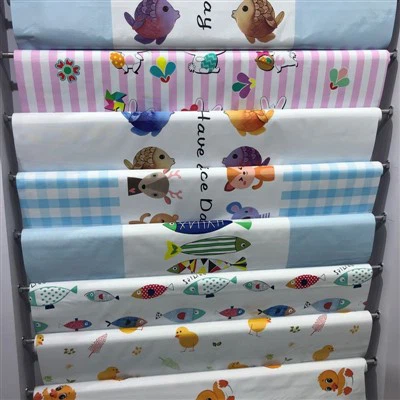
First, let’s get clear on what PVC film actually is, because not all PVC is made the same. PVC (polyvinyl chloride) is a flexible, durable thermoplastic—you’ve seen it in things like inflatable pool toys, clear packaging clamshells, flexible signage, even medical device components. The film comes in a range of gauges (thicknesses, measured in mils—1 mil is 0.001 inches), from super thin 1-mil stuff used for disposable packaging to heavy-duty 20-mil film for outdoor signage. It’s also available in different finishes: glossy, matte, satin, even textured for things like promotional banners. That variety is great, but it means the printing process has to adjust to fit the film you’re working with, which is where most people who try to print at home run into issues.
So, can you do it yourself? The short answer is: Maybe, but only if you have the right tools and a lot of patience. I’ve seen small business owners with desktop inkjet printers print their own logos on thin, low-gloss PVC film for sample packaging, but I’ve also seen that same approach totally ruin a $50 roll of medium-gauge PVC because they didn’t account for the film’s unique properties. Let’s walk through the pros and cons of DIY printing first, then get into when it makes sense to work with a custom printer like us, since that’s my wheelhouse.
First, the pros of DIY PVC printing: It’s cheap for small batches, obviously. If you only need 50 custom-printed bags for a local pop-up shop, driving to a commercial printer might cost you more in setup fees than the whole batch is worth. DIY also gives you total control over the process—you can tweak designs last minute, print only what you need, no waiting for turnaround times. That’s a huge win for small teams or one-off projects. But here’s where the cons hit hard, and this is where most people get stuck.
The biggest problem with DIY printing on PVC is the film’s surface tension. PVC is a non-porous material, right? That means regular ink—like the ink in your desktop inkjet or laser printer—just sits on top of the film instead of absorbing into it. If you run a regular printer, the ink will smudge, scratch off if it gets rubbed, or even crack when the film is bent. I’ve had clients come to us with DIY-printed PVC samples that look fine right after printing, but by the next day, the logo is peeling off because they skipped the surface treatment step that’s non-negotiable for PVC. That surface treatment is usually a flame treatment, corona treatment, or a chemical primer that etches tiny, invisible holes into the PVC surface so ink can stick. Most desktop printers don’t have that built-in, so if you don’t buy a separate treatment tool or special ink, your logo is going to be garbage.
Then there’s ink type. Regular water-based ink won’t stick to PVC at all—solvent-based ink is the standard for vinyl and PVC printing, but that stuff is messy, toxic, and not safe for food packaging or items that come into contact with skin. Eco-solvent ink is a slightly better option, but it still requires ventilation because it releases volatile organic compounds (VOCs) while it cures. UV-curable ink is even better—It dries instantly under UV light, sticks really well to non-porous surfaces like PVC, and has low VOCs, but you need a special UV printer to use it. And if you’re using a laser printer? Toner is even worse for PVC, because it melts unevenly on the non-porous surface and comes off with the slightest friction. I’ve seen people try to use clear spray sealant to fix that, but even then, it doesn’t adhere right and makes the film look cloudy.
Another DIY pitfall: color accuracy and consistency. PVC has a slight yellow or gray tint to it, depending on the grade, and if you don’t calibrate your printer specifically for PVC, your logo colors will look off. A bright red on plain paper might turn into a dull orange on matte PVC, and that’s really hard to fix in post. For small batches, that might be okay, but if you need multiple copies that match, DIY is risky. I once had a craft brand that printed their own labels for their hand soap at home, and they ended up with three different shades of blue across 100 labels because their home printer didn’t account for the PVC’s base color. They ended up reprinting all of them with us, which cost them way more than if they’d started with us.
Now, when is DIY PVC printing actually worth it? If you’re working with ultra-thin, flexible PVC film (1-2 mils) for one-off projects, like custom party balloons or small product tags, and you invest in a small desktop UV printer that’s designed for flexible materials, that works. I’ve also had a few clients who print their own logos on PVC for prototype parts—like custom inserts for trade show displays—where they just need a rough version to test the design. But even then, I always tell them to order a sample roll first, because not all PVC is compatible with their printer. For example, textured PVC film won’t work well with flatbed UV printers, because the texture can create gaps between the print head and the film, leading to uneven ink application.
Now, let’s talk about working with a custom printed PVC film supplier like us, which is what I do every day, because that’s the best option for 90% of people asking this question. Let’s go over why partnering with a pro will give you results that last, no matter what your project is.
First, we handle all the material prep. Like I mentioned earlier, surface treatment is non-negotiable for PVC, and we have industrial-scale corona treatment lines that treat the entire roll evenly, not just spot areas like DIY methods. That means your ink will stick for years, even if the PVC is bent, stretched, or exposed to the elements. For example, if you’re making inflatable pool toys printed with your logo, we can treat the film so the ink doesn’t crack when the toy is inflated and deflated hundreds of times over the summer. DIY ink would peel off after one use.
Then, ink and print methods tailored to your project. We use a range of printing techniques depending on your needs: flexographic printing for large batches (1,000+ rolls) of packaging, which is fast, affordable, and great for bold, simple logos; digital printing for small to medium batches, which gives you high resolution and full color gradients, perfect for detailed artwork; and screen printing for thick, durable prints that work on heavy-gauge PVC for outdoor signage or industrial parts. We also use food-safe inks if you need PVC for packaging food, medical devices, or kids’ products—no toxic fumes, no peeling, no risk of ink leaching. That’s something you can’t get with DIY printing for those applications.
Color accuracy is another big one. We use industry-standard color calibration tools that match your logo to the exact Pantone or CMYK values you provide, so you don’t end up with that dull orange red I mentioned earlier. We send digital proofs before printing, so you can tweak colors, adjust sizing, and confirm everything is right before we run the full batch. No wasted time or money on bad prints.
Durability testing is something most DIY people never think about. When you print with us, we can test your custom PVC film for things like scratch resistance, UV fading, water resistance, and flexibility. If your PVC is going to be used outdoors for a year, we can print it with UV-stabilized inks that won’t fade in the sun. If it’s going to be used in a cold storage facility, we can make sure the ink doesn’t crack when the film gets cold and stiff. DIY printers rarely have that testing equipment, so you’re taking a risk that your logo will look terrible after a week.
Now, let’s address some common misconceptions I hear all the time from people who are on the fence about DIY vs custom printing. First, “DIY is cheaper.” For batches under 50 units, sure—we have setup fees, so small batches might be more expensive than printing at home. But if you need 100 or more units, the cost difference disappears really fast. The ink and treatment for DIY PVC adds up, and if you mess up a roll, that’s money wasted. I once had a café owner who tried to print her own takeout bags for her lattes, and she messed up three rolls of PVC before she got a batch that looked halfway decent. By then, she would have saved money by ordering from us.
Another misconception: “PVC is too hard to print, so I should use a different material.” No, PVC is one of the most popular materials for custom printing because it’s so versatile. It’s cheaper than polyester or polyurethane, it’s flexible, durable, and available in every color and finish you can imagine. The only hard part is printing it yourself—with the right partner, it’s one of the easiest materials to work with for custom graphics.
Let me give you a real example that’s top of mind for me right now. Last quarter, a small startup that makes custom dog training gear came to us. They were trying to print their logo on PVC leash tabs at home, and they kept having the logo scratch off when dogs chewed on the tabs. They were doing DIY, using a standard inkjet and no surface treatment. We worked with them to print 500 custom PVC leash tabs using UV-curable ink, treated with a corona line, and the result was a logo that didn’t scratch even after 100 rounds of chewy testing. They’ve reordered three times since then, and they now recommend us to all their fellow startup founders.
So, to wrap this up: Can you print your own logo on PVC film? Technically, yes, but only if you have the right equipment, knowledge, and tolerance for trial and error. For most projects—whether that’s packaging, promotional goods, signage, industrial parts, or anything else that needs to look professional and last—printing with a custom PVC film supplier is the better choice. You get consistent results, durable prints, food-safe options, color accuracy, and no wasted time or money on bad prints.
If you’re still on the fence, my advice is simple: Order a small sample roll of PVC film first, before you invest in any supplies. Test it with your printer, see if the ink sticks, check the color, and decide if the DIY results are good enough for your needs. If they are, great—save yourself the setup costs and go for it. If not, we’re here to help. We work with every kind of client, from side hustlers making 100 promotional flyers to large retail brands needing 10,000 custom packaging rolls. We can walk you through the process, answer your questions, and make sure your logo looks exactly how you want it, on PVC film that fits your project’s needs.
PVC Film At the end of the day, your logo is the face of your brand. You don’t want it peeling off after one use, fading in the sun, or looking dull because you skipped a critical step in printing. If you’re ready to make custom printed PVC film that stands the test of time, let’s connect and talk through your project. We can go over material options, print methods, turnaround times, and anything else you need to know to get the perfect result.
References
- Association of Plastic Recyclers. (2022). PVC Film Properties and Printing Compatibility.
- GIDEA. (2021). Surface Treatment Methods for Non-Porous Thermoplastics in Printing.
- Flexible Packaging Association. (2023). Ink Selection for PVC Packaging Applications.
- Specialty Graphics Association. (2022). Best Practices for Printing on Flexible PVC Films.
Nantong Dahe Composite New Material Technology Co., Ltd.
Address: South Side of Pinghai Highway, Pinghe Village, Dongshe Town, Tongzhou District, Nantong City, Jiangsu Province, China
E-mail: nantongdahe@outlook.com
WebSite: https://www.cndahetech.com/
